MCP server
The EcomSolo MCP server lets an AI assistant query your data directly. Connect it once and you can ask, in plain language:
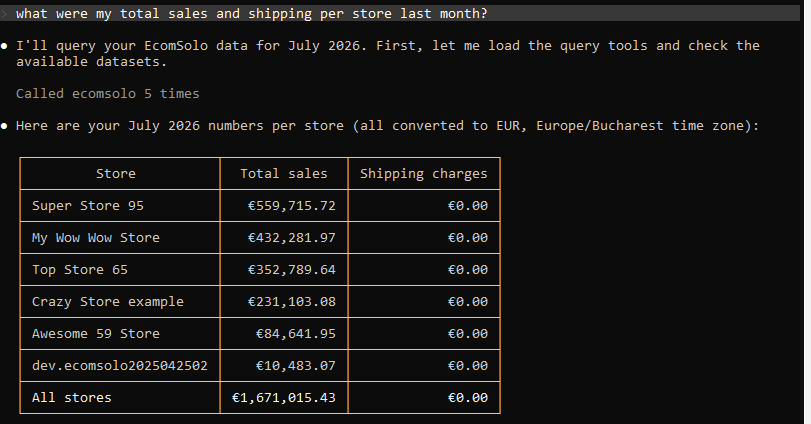
What were my total sales and shipping per store last month?
and get a real answer computed across every Shopify store connected to your account — not a guess, and not one store at a time.
MCP (the Model Context Protocol) is the open
standard assistants use to talk to external systems. Our server is a thin layer
over the same /v1 API: identical data, identical
permissions, identical rate limits.
Endpoint
https://api.ecomsolo.com/mcp
Authentication is the same API key you use everywhere else — an
Authorization: Bearer esk_live_… header. See
Authentication for creating one.
The server implements MCP protocol revision 2026-07-28 over Streamable HTTP. It is stateless: there is no session to establish and no handshake to complete.
Connecting
Claude Code (CLI)
One command:
claude mcp add --transport http ecomsolo https://api.ecomsolo.com/mcp \
  --header "Authorization: Bearer esk_live_YOUR_KEY"
Verify with claude mcp list — you should see ecomsolo: ✔ Connected. Then ask
your question in any Claude Code session.
claude.ai and Claude Desktop
Custom connectors on claude.ai and Claude Desktop require OAuth, which this server does not offer yet — an API key cannot be entered there directly. Use Claude Code for now; OAuth support is on our roadmap.
Other clients
Any MCP client that supports Streamable HTTP and lets you set an
Authorization header works: point it at the endpoint above and pass
Bearer esk_live_….
What the assistant can do
Four tools are exposed:
| Tool | What it does |
|---|---|
list_datasets | Lists every queryable dataset and its fields, so the assistant can discover the data model instead of guessing field names. |
run_query | Runs a SoloQL query across all your stores and returns the rows. |
run_saved_report | Lists your saved reports, or runs one by id — the reliable way to reproduce a number you already see in the app. |
trigger_export | Lists your export configurations, or triggers one. Requires a key with the exports scope. |
Questions that work well
- "Compare total sales per store for the last 30 days."
- "Which products sold best across all my stores in July?"
- "Run my Monthly Revenue report and summarise what changed."
- "How much did I collect in shipping last quarter, by country?"
The assistant will usually call list_datasets first to learn the field names,
then run_query. That is expected, and it is why answers are grounded in your
real data rather than invented.
What it cannot do
The API is read-only. There are no tools to create, update or delete anything in your stores. An assistant connected to EcomSolo can read your data and trigger an export you have already configured — nothing else.
Exports are asynchronous: trigger_export returns a job id as soon as the job is
queued, not when the file is ready. Poll with
GET /v1/export-jobs/{id} to download it.
Permissions, scopes and limits
Everything that governs the REST API governs MCP identically, because it is the same code underneath:
- Plan — the API is included on Advanced and above.
- Scopes —
read_datafor queries and reports,exportsfor triggering exports. A key missing a scope gets a clear message the assistant can relay. - Store restrictions — if a key is limited to certain stores, MCP sees only those stores. The assistant cannot widen that.
- Rate limits — MCP calls count against the same per-minute budget as regular API calls. See Rate limits.
- Revocation — revoke the key and the connection stops working immediately.
Security
Treat an MCP connection as what it is: you are granting an AI assistant read access to your business data. A few things worth knowing.
- Create a dedicated key for the assistant rather than reusing one that is already wired into a production integration. You can then revoke it without breaking anything else.
- Grant the narrowest scopes that do the job. If you never want the
assistant triggering exports, do not give it the
exportsscope. - If the key should only see some stores, restrict it to those stores when you create it.
- The conversation, including the data returned, goes to whichever AI provider you connected. That is inherent to the arrangement, not specific to EcomSolo — but it is worth a deliberate decision rather than a default one.
FAQ
Does this cost extra? No. MCP is part of the API, included on Advanced and above at no additional charge. There are no per-call fees.
Do I need a separate key for MCP? Technically no — any API key works. In practice yes, we recommend one, so it can be revoked independently.
Can the assistant change my Shopify data?
No. The API is read-only. The only tool with any effect is trigger_export,
which runs an export you configured yourself.
Which stores does it see? Every store connected to your EcomSolo account, unless the key is restricted to a subset. A single question is answered across all of them at once.
What if the assistant gets a field name wrong?
It gets a validation error explaining the problem and can correct itself —
usually by calling list_datasets to find the right name.
Related
- The Ecomsolo API — REST and SoloQL over every store on your account.
- 100+ reports across all your stores — the same data without writing a query.